The DogeChain ecosystem has opened a new playground for meme coin traders and early-stage token hunters. Over a short period, several DogeChain-based tokens have surged from near zero to impressive market capitalizations, with some crossing the million-dollar mark. As liquidity flows in and communities grow, interest in buying these speculative tokens continues to increase.
However, for newcomers, buying DogeChain-based meme tokens can feel overwhelming. Terms like wrapped DOGE (wDOGE), slippage tolerance, liquidity pools, contract addresses, and transaction tax can easily confuse anyone unfamiliar with decentralized exchanges. This guide breaks everything down into clear, practical steps so you can confidently purchase tokens on DogeSwap.
Understanding the DogeChain Ecosystem
DogeChain is an EVM-compatible blockchain that allows users to utilize Dogecoin in decentralized finance (DeFi) applications. Instead of simply holding DOGE in a wallet, users can bridge it into DogeChain and convert it into wrapped DOGE (wDOGE), which functions as the primary trading currency on decentralized exchanges like DogeSwap.
Because DogeChain is relatively new compared to Ethereum or BNB Chain, many tokens launching on it are speculative meme coins. Some projects present detailed roadmaps and liquidity locks, while others exist purely for short-term trading momentum. As a result, traders need both technical knowledge and caution when entering this market.
Step 1: Set Up MetaMask for DogeChain
Before buying any token, you need a compatible wallet. MetaMask is the most widely used browser wallet for EVM networks.
To begin:
- Install MetaMask if you don’t already have it.
- Add the DogeChain network manually using the official RPC details.
- Save and switch your wallet to DogeChain.
Once configured, your wallet will be able to receive wDOGE and interact with DogeSwap.
Step 2: Send DOGE and Bridge to wDOGE
After setting up MetaMask:
- Send DOGE from your exchange or existing wallet.
- Bridge your DOGE into DogeChain so it becomes wrapped DOGE (wDOGE).
Wrapped DOGE is required because decentralized exchanges operate using token standards compatible with smart contracts. wDOGE acts as the base currency for trading new tokens on DogeSwap.
Always double-check addresses before sending funds to avoid irreversible mistakes.
Step 3: Access DogeSwap DEX
DogeSwap is one of the primary decentralized exchanges on DogeChain. It functions similarly to PancakeSwap or Uniswap.
When you visit DogeSwap:
- Connect your MetaMask wallet.
- Ensure you are on the DogeChain network.
- Navigate to the “Swap” section.
You will see two fields:
- “From” (usually wDOGE)
- “To” (the token you want to purchase)
At this stage, you need the correct token contract address.
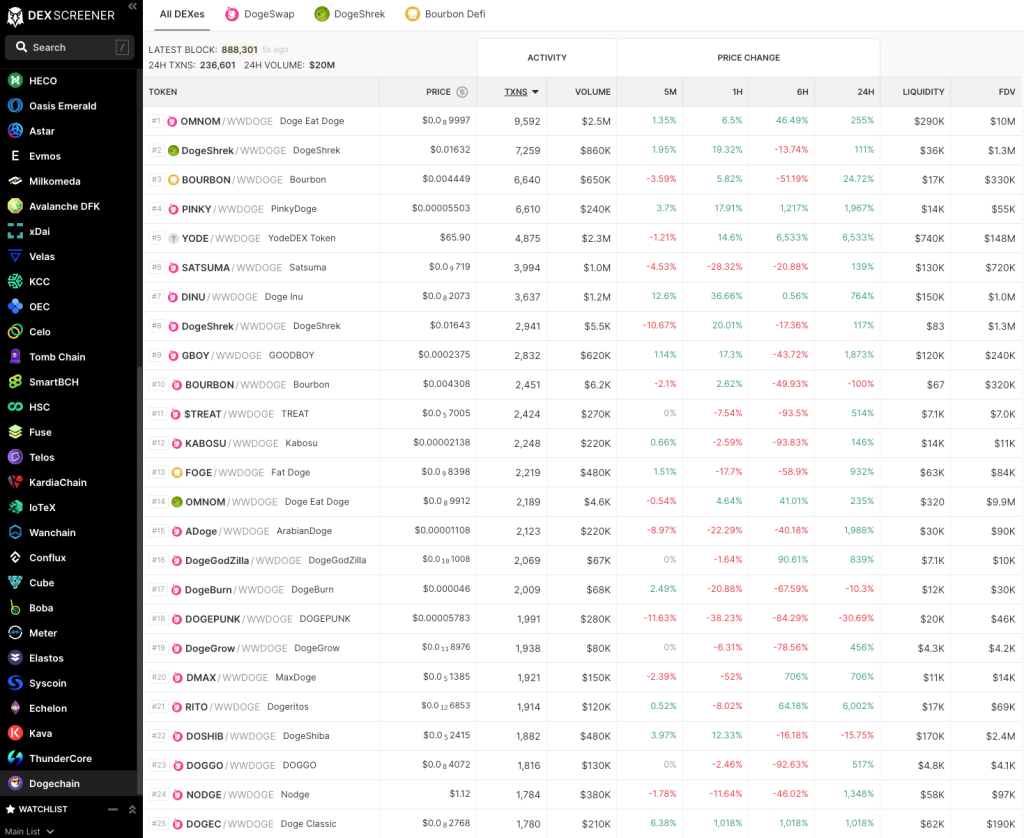
Step 4: Find Reliable Tokens on DexScreener
Choosing which token to buy requires research. One of the most reliable analytics tools is DexScreener.
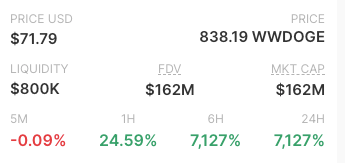
DexScreener provides:
- Live price charts
- Liquidity data
- Fully diluted valuation (FDV)
- Recent trade history
- Token contract addresses
Navigate to the DogeChain section within DexScreener to see all active tokens trading on DogeSwap and other DogeChain-supported DEX platforms.
When evaluating a token, review:
- Liquidity size (higher liquidity generally means smoother trades)
- 5-minute, 1-hour, 6-hour, and 24-hour performance
- Trading volume
- Number of transactions
- Community activity
Strong liquidity and consistent trading activity often indicate more stability than extremely thin liquidity pools.
Step 5: Copy the Token Contract Address
After selecting a token on DexScreener:
- Open its individual page.
- Locate the contract address displayed on the right panel.
- Copy the contract address carefully.
Never rely solely on token names. Scam tokens often use similar names to popular projects. The contract address is the only reliable identifier.
Step 6: Import the Token on DogeSwap
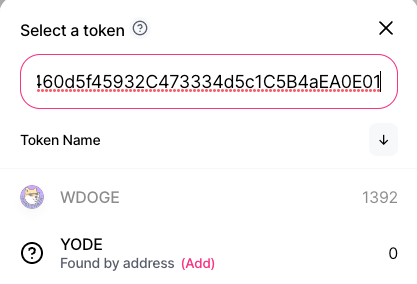
Return to DogeSwap and follow these steps:
- In the “To” field, paste the copied contract address.
- Confirm the token appears.
- Click to add/import it into your swap interface.
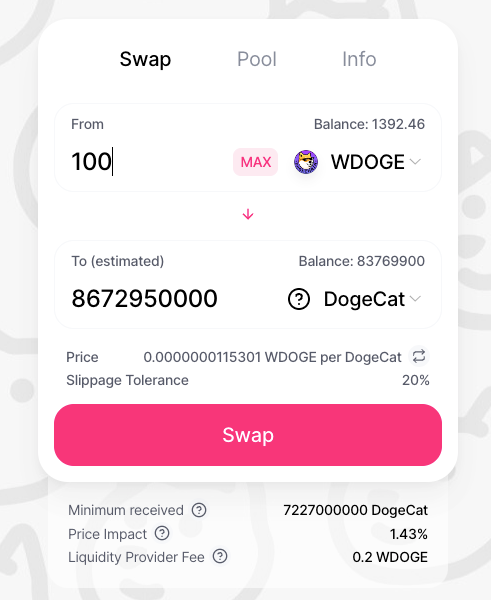
Once imported, enter the amount of wDOGE you want to exchange. The interface will automatically calculate how many tokens you are expected to receive.
At the bottom of the swap window, you will see:
- Estimated tokens received
- Minimum tokens (after slippage)
- Price impact
- Network fees
Review all details before proceeding.
Step 7: Adjust Slippage Settings
One of the most common errors traders encounter when buying volatile meme tokens is a transaction failure.
You may see an error message similar to:
“The transaction cannot succeed due to error: missing revert data in call exception; Transaction reverted without a reason string.”
In most cases, this happens because slippage tolerance is set too low.
Meme tokens often have:
- High price volatility
- Transaction taxes
- Rapid price movement during confirmation
To resolve this:
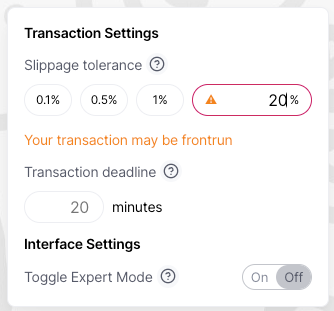
- Click the settings (gear/wrench icon).
- Increase slippage tolerance.
Many traders set slippage between 10% and 20% for high-volatility tokens. Some tokens with built-in taxes may require even higher tolerance.
Be aware that higher slippage increases the risk of receiving fewer tokens if the price moves quickly.
Step 8: Confirm the Transaction in MetaMask
After clicking “Swap”:
- A MetaMask pop-up will appear.
- Review the gas fee.
- Confirm the transaction.
Once approved, the trade will process on the DogeChain network.
After confirmation, your new tokens will appear in your wallet. If they do not show automatically, you may need to manually import the token using its contract address.
Understanding Key Concepts Before You Buy
Liquidity
Liquidity refers to how much wDOGE and tokens are locked in the trading pool. Low liquidity can lead to extreme price swings and difficulty exiting positions.
FDV (Fully Diluted Valuation)
FDV estimates what the market cap would be if all tokens were in circulation. High FDV with low liquidity can indicate inflated valuations.
Token Tax
Some tokens charge buy or sell tax. For example:
- 5% marketing fee
- 5% liquidity fee
This tax affects the final number of tokens received and often requires higher slippage tolerance.
Price Impact
Large trades relative to liquidity cause higher price impact. Always check the percentage shown before confirming.
Risk Awareness in DogeChain Meme Trading
The meme token space on DogeChain moves quickly. Some projects aim for long-term growth, liquidity locking, and transparent development. Others exist purely for short-term speculation.
Risks include:
- Rug pulls
- Liquidity removal
- Smart contract exploits
- Extreme volatility
- High transaction taxes
Before buying:
- Check whether liquidity is locked.
- Review social media presence.
- Verify contract details.
- Avoid investing more than you can afford to lose.
Speculative tokens can generate rapid returns, but they can also drop just as quickly.
Optimizing Your Strategy
If you are actively trading DogeChain tokens:
- Monitor charts on DexScreener frequently.
- Track volume spikes.
- Watch liquidity changes.
- Avoid chasing massive green candles without pullbacks.
- Split capital into smaller entries rather than going all in.
Diversification and disciplined risk management can improve long-term sustainability in high-volatility environments.
Final Thoughts
Buying DogeChain-based meme tokens on DogeSwap becomes straightforward once you understand how MetaMask, wDOGE, decentralized exchanges, contract addresses, and slippage tolerance work together. The technical barrier is often the biggest challenge for beginners, but with the right setup and research tools, the process becomes manageable.
As the DogeChain ecosystem continues to expand, early participation in new tokens may attract traders looking for high-risk, high-reward opportunities. Careful research, proper wallet setup, and correct transaction settings are essential when navigating this fast-moving market.